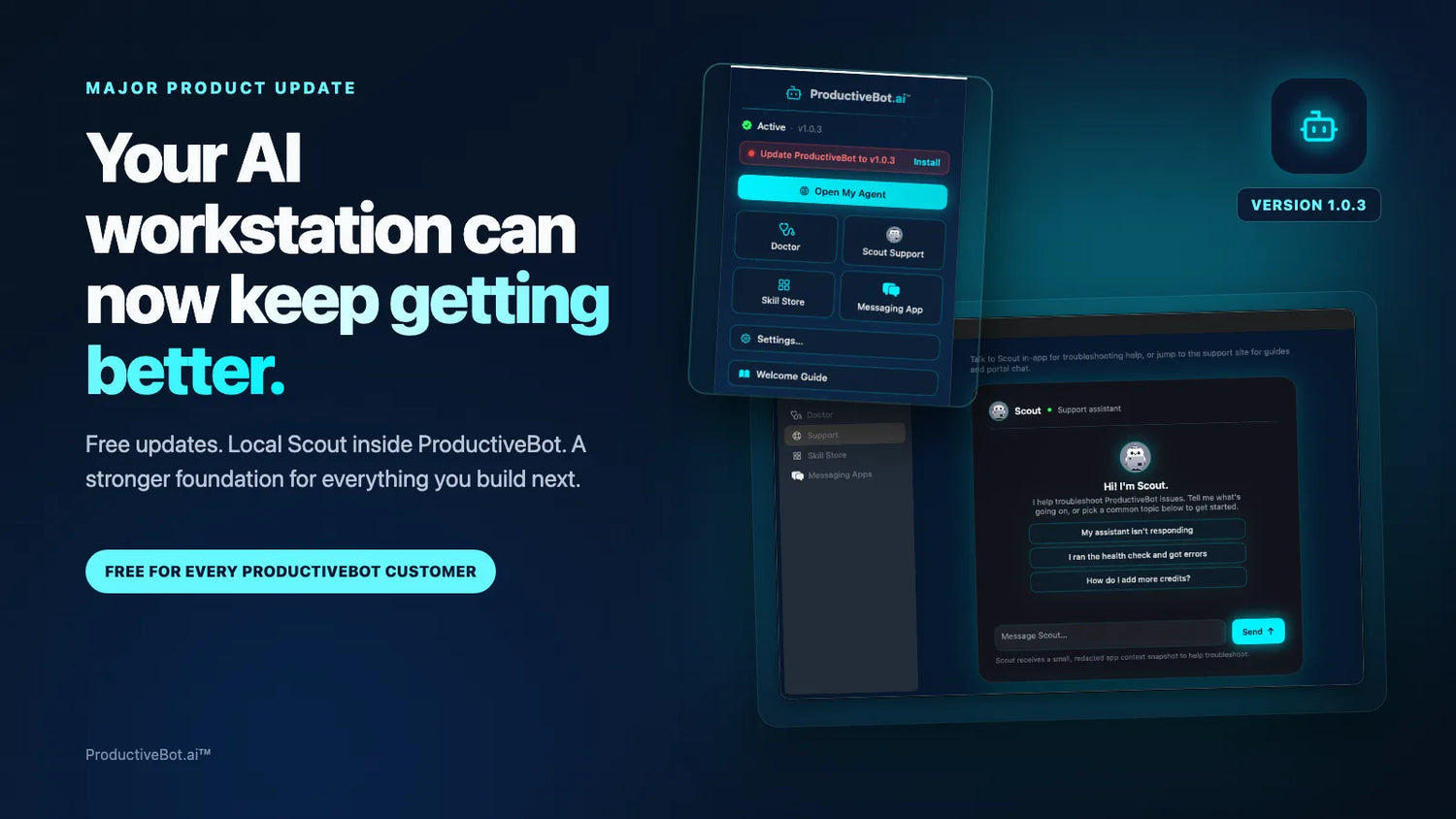
ProductiveBot 1.0.3 adds free in-app updates, Local Scout support, easier setup, and a better way to improve your AI workstation over time.
Your ProductiveBot should grow with your business. It should not stay frozen at the version that arrived on day one.
Version 1.0.3 is a major step toward that goal. It gives ProductiveBot a direct path for future software updates, brings Scout into the ProductiveBot app, and strengthens setup, diagnostics, and recovery.
ProductiveBot 1.0.3 is free for every current ProductiveBot customer. Future ProductiveBot software upgrades will be free too.
The biggest change is what happens after 1.0.3
ProductiveBot can now check for new ProductiveBot releases and tell you when an update is ready. You can see the new version and choose when to install it from the ProductiveBot menu.
This gives us a faster way to deliver important security improvements, new functionality, reliability fixes, and better support tools. You will not need a new workstation every time ProductiveBot gains an important capability.
The experience stays in your control. ProductiveBot checks for releases and lets you choose when to install one. It does not silently replace the software without your involvement.

Meet Local Scout
Scout has become one of the ProductiveBot features customers ask us about most. Until now, many Scout conversations started in the web support portal.
Version 1.0.3 brings Scout directly into ProductiveBot on your Mac. We are calling this experience Local Scout for now.
Local Scout lets you:
- Chat with Scout without leaving ProductiveBot.
- Ask for help during setup.
- Start with common support questions.
- Continue a troubleshooting conversation inside the app.
- Share a small, redacted snapshot of relevant app context so Scout has a better starting point.
- Bring ProductiveBot Doctor results into the conversation, then review or edit the message before choosing to send it.
Local Scout does not mean every part of Scout runs offline. It means Scout is available where you already work, inside ProductiveBot, instead of requiring a separate trip to the web portal.

Support that helps you move forward
Scout is growing beyond answering technical questions. Our goal is to make Scout a guide that helps you get more value from your agents.
Today, Scout can help explain setup steps, troubleshoot common problems, and interpret diagnostic information. ProductiveBot Doctor can prepare useful context for Scout, but you decide what to review, edit, and send.

Future free updates will expand how Scout can guide repairs, recommend useful workflows, and help you plan around the goals you want your agents to achieve. Those deeper capabilities are part of the direction ahead, not a claim that every future Scout feature ships in 1.0.3.
ProductiveBot support should not only help when something breaks. It should help you make progress.
Keep the tools and work you already have
An upgrade should not force you to throw away the system you have already built.
ProductiveBot is designed to strengthen the AI tools on your Mac rather than make you choose only one. It supports customers using OpenClaw and Hermes Agent, and it can live alongside tools such as Claude Code and Codex. You do not need to remove those tools just to keep using ProductiveBot.
ProductiveBot adds the support, diagnostics, memory, security, setup guidance, and update path around your workstation. The agent tools underneath can keep evolving.
This is not about locking you into one model or one agent runner. It is about helping the systems you choose work more clearly and cohesively.
Designed to fit into your current setup
The 1.0.3 upgrade path is designed to recognize an existing ProductiveBot installation, preserve its agent configuration, and avoid sending established customers through duplicate onboarding.
You should not need to recreate your workflows, reconnect everything from the beginning, or start over with a blank system. Behind the scenes, 1.0.3 also removes obsolete setup entry points and improves how ProductiveBot starts and recovers.
As with any software change, no responsible company should promise that an update can never encounter an issue. Our goal is a smooth upgrade with minimal interruption, backed by Doctor, Scout, and ProductiveBot support if something looks unexpected.
What else is included in ProductiveBot 1.0.3
Easier ChatGPT connection
New and returning setup flows can connect a supported ChatGPT subscription through a guided sign-in experience. ProductiveBot shows the sign-in steps, verifies the connection, and keeps API keys as an advanced option instead of the default path.
A stronger ProductiveBot Doctor
Doctor gives you a clearer health report when something needs attention. It recognizes newer sign-in methods, handles more configuration types, and can prepare useful diagnostic context for Scout.
A clearer workspace
The updated menu and workspace tour make it easier to find Updates, Open My Agent, Doctor, Scout Support, the Skill Store, Messaging Apps, Settings, and the Welcome Guide.
Better first launch and recovery
Version 1.0.3 includes extensive work on installation, startup, and recovery. It reduces unnecessary setup steps, avoids duplicate setup processes, improves Apple silicon installation, and gives ProductiveBot safer ways to recover when a component needs attention.
A more guided setup for new installations
Fresh ProductiveBot setups now use a polished eight-step experience. Scout stays nearby, ChatGPT sign-in is easier, messaging guidance is clearer, and the final workspace tour shows customers where to begin.

Free now and free going forward
ProductiveBot 1.0.3 is free for every current ProductiveBot customer. Future ProductiveBot software upgrades will be free too.
You bought a workstation your business owns. Our job is to keep making that workstation more useful, more dependable, and easier to support over time.
Version 1.0.3 is the foundation for that next stage.
Common questions
Is ProductiveBot 1.0.3 free?
Yes. Version 1.0.3 is free for every ProductiveBot customer. Future ProductiveBot software upgrades will be free as well.
Will the update erase my existing ProductiveBot setup?
The upgrade is designed to recognize an existing installation, preserve its agent configuration, and avoid duplicate onboarding. You should not need to rebuild your workflows or reconnect everything from the beginning.
Does ProductiveBot 1.0.3 install updates automatically?
ProductiveBot checks for available updates and shows you when a new version is ready. You choose when to install it. The current release does not silently install ProductiveBot software without your involvement.
What is Local Scout?
Local Scout is Scout available directly inside the ProductiveBot app on your Mac. It gives you in-app support, relevant redacted context, common help topics, and a path from ProductiveBot Doctor into a Scout conversation.
Does Local Scout work without the internet?
No. The Scout experience is available inside the ProductiveBot app, but Scout still uses ProductiveBot's support service to answer questions. Local Scout describes where you use Scout, not a fully offline service.
Can I keep using OpenClaw or Hermes Agent?
Yes. ProductiveBot supports agent platforms including OpenClaw and Hermes Agent. The 1.0.3 update does not require you to abandon the agent tools or workflows you already use.
What if I also use Claude Code or Codex?
You can keep using them. ProductiveBot can remain the support, diagnostics, memory, security, and management layer for your workstation without requiring you to remove other tools.
Your ProductiveBot is ready to grow with you
Have questions about version 1.0.3 or what it means for your setup? Scout is available anytime.
Ask Scout


Leave a comment
This site is protected by hCaptcha and the hCaptcha Privacy Policy and Terms of Service apply.